API Testing
What is Testing?STLC
Test levels
Testing Types
Test Objectives
Errors, Defects, FailuresRoot Causes Analysis
Test Scenarios
Test case Writing
Test Planning & designing
Defect life cycleTesting Principles
Shift left approach
Static and dynamic testing
Testing techniques
Bug writing
Entry and Exit criteria
Test Case Prioritization
Risk Management
Bug triage, bug leakage and bug releaseReport writing
URS, BRS, SRS documents
Testing metrics
Testing tools
API : Application Programming Interface
Definition : API is a set of definitions and protocols that allows technology products and services to communicate via the internet.
API Call : The process of sending the request to your API after setting up the right endpoints.
Web Services
Network-accessible API focused on interoperable communication between machines
Typically use HTTP, SOAP, REST, XML-RPC
Mostly XML (SOAP) historically, some REST use JSON
Must work over a network
Always remote and network-based
Cross-platform enterprise integration, B2B services
Generally more complex due to protocol standards (WSDL, UDDI)
Supports robust standards like WS-Security
SOAP Web Services, RESTful web services
APIs
Broad interface enabling communication between software components (local or remote)
Use many protocols including HTTP, REST, SOAP, gRPC, WebSockets, etc.
Flexible—JSON, XML, binary, custom formats
May or may not require network (can be local)
Local or remote; includes internal and external interfaces
Application features integration, local system calls, web/mobile backends
Can be simpler and more lightweight
Uses various mechanisms like OAuth, API keys, JWT
REST APIs, GraphQL APIs, OS system APIs
All web services are APIs, but not all APIs are web services.
Rest vs SOAP :
HTTP Methods :
GET: Retrieves data from the server without modifying it. This is the most frequently used method for reading resources.
POST: Sends data to the server to create a new resource or trigger a processing operation. It is not idempotent, meaning multiple identical requests may create multiple resources.
PUT: Updates an existing resource or creates it if it does not exist. It replaces the entire resource content and is idempotent.
DELETE: Removes a resource from the server. It is usually idempotent, meaning repeated calls have the same effect as one call.
PATCH: Partially updates a resource with provided changes. It is less common but gaining adoption for partial resource modifications and is typically non-idempotent.
Other less commonly used HTTP methods include HEAD, OPTIONS, CONNECT, and TRACE.
PUT vs Patch Method :
Path Parameters vs Query Parameters :
HTTP Status/Error Codes :
2xx Success (Request Successfully Processed)
200 OK: The request succeeded and the server returned the requested data.
201 Created: The request succeeded and a new resource was created (e.g., after POST).
202 Accepted: The request has been accepted but processing is not yet complete (async processing).
204 No Content: The request succeeded but there is no content to return (commonly used for DELETE).
3xx Redirection (Further Action Needed)
301 Moved Permanently: The requested resource has been permanently moved to a new URL.
302 Found: The resource is temporarily under a different URL; client should use the original URL for future requests.
303 See Other: The response to the request can be found under another URL using GET.
304 Not Modified: The resource has not changed since the last request (used with caching).
4xx Client Errors (Request Error)
400 Bad Request: The request is malformed or contains invalid syntax.
401 Unauthorized: Authentication is required or has failed.
403 Forbidden: The server understood the request but refuses to authorize it.
404 Not Found: The requested resource does not exist on the server.
405 Method Not Allowed: The HTTP method used is not supported by the target resource.
5xx Server Errors (Server Failed to Fulfill Request)
500 Internal Server Error: The server encountered an unexpected condition that prevented it from fulfilling the request.
501 Not Implemented: The server does not support the functionality needed to fulfill the request.
API Keys : An API key is a unique identifier that enables other softwares to authenticate an user.
Payload : The data sent in an API request or response, often in the form of a JSON object.
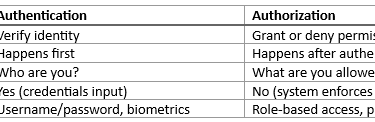
Authentication : The process of verifying the identity of a client or user before allowing them to access an API. This is often done using an API key.
The most commonly used authentication methods in API testing are:
OAuth 2.0: The most popular choice for secure, delegated authorization using tokens. Ideal for third-party integrations and provides fine-grained access control with scoped permissions.
API Keys: Simple token-based mechanism mostly used for internal services or public APIs. Easy to implement but less secure unless properly managed.
JWT (JSON Web Tokens): Stateless, self-contained tokens commonly used for authentication in microservices and distributed systems. Efficient but lacks revocation.
Basic Authentication: Sends username and password encoded in headers. Outdated and less secure; mostly used for legacy or internal systems over HTTPS.
Bearer Authentication: Token-based authentication sent via HTTP headers, widely used for modern web APIs offering scalability.
Authorization : Authorization is the process of determining whether a user or system has the necessary permissions to access a specific resource or perform a particular action within an application or API.
Authentication vs Authorization :
API Rate limiting : Limiting the number of API request within certain timeframe
REST : REST, which stands for Representational State Transfer, is an architectural style for designing networked applications, especially web APIs. It defines a set of principles and constraints that promote scalable, stateless, and uniform communication between clients and servers over HTTP.
Key principles of REST include:
Resource-Based Architecture: Everything is a resource identified by a unique URI (Uniform Resource Identifier). Resources are manipulated using representations, often in JSON or XML.
Statelessness: Each client request contains all the information needed for the server to fulfill it, without relying on stored context between requests. This improves scalability and reliability.
Client-Server Separation: Clients and servers are independent; they interact via a standardized interface but can evolve separately.
Uniform Interface: Uses standardized HTTP methods (GET, POST, PUT, DELETE) to perform actions on resources, ensuring a consistent approach to interface design.
Cacheability: Responses can be explicitly marked as cacheable or non-cacheable to optimize performance.
Layered System: The architecture can be composed of multiple layers, such as load balancers, proxy servers, or authentication layers, which are invisible to the client.
RESTful APIs implement these principles to enable flexible, reliable, and scalable web services for modern web and mobile applications. They allow clients to access and manipulate resources in a predictable, stateless manner using standard web protocols
Components of HTTP request :
URL (Base URI + Endpoint)
HTTP request method
Resources and Parameters
Request Header
Request Body/Payload [required only for POST, PUT, DELETE methods, gets ignored for GET method]
Authentication
Functional Testing:
Status code
Correct status code
Response body
Correct response body
Headers
Correct headers
Business logic
Error handling
Correct status code
Correct error/message
No extra data displayed
Unit Testing:
One endpoint
Minimal dependencies
Mocked services
Integration Testing:
Security Testing
Authentication
Authorization
Invalid tokens
SQL injection
Role-based access
Errors, Defects, Failures
Error : An Error is a human mistake made during software development.
Defects (Bug) : A Defect is a flaw in the software code or design caused by an error.
Failures : A Failure occurs when the software behaves incorrectly during execution.
Bug triage, Bug leakage and Bug release
Bug triage : Bug Triage is the process of reviewing, analyzing, prioritizing, and assigning reported defects to decide what should be fixed, when, and by whom.
Bug leakage : Bug Leakage occurs when a defect is found by the customer in production, but was not detected by the testing team during testing phases.
Bug release : Bug Release happens when a known defect is intentionally released into production with management or client approval.
Defect Life Cycle
The Defect Life Cycle describes the different states a defect goes through from the time it is identified until it is closed.
New - Tester logs a defect in a defect tracking tool.
Assigned - Tester assigns the defect to a developer or team lead.
Open - Developer starts working on the defect.
Fixed - Developer fixes the defect and updates the status.
Retest - Tester retests the defect in the new build.
Verified - Tester confirms the fix is working as expected.
Closed - Defect is closed after successful verification.
Reopened - If defect still exists after fix, sent back to developer.
Rejected - Not a valid defect (working as designed).
Deferred - Fix postponed to future release.
Duplicate - Same defect already reported.
Not a Bug - Expected behavior.
Cannot Reproduce - Unable to reproduce the bug by developer.


Defect Life Cycle