
End-to-End Automation Pipeline
Building an End-to-End Automation Pipeline Using GitHub, Jenkins, and Allure
Omkar Deshpande
1/3/20262 min read
🚀 Building an End-to-End Automation Pipeline Using GitHub, Jenkins, and Allure
In modern software development, automation is no longer optional. Faster releases, reliable builds, and immediate feedback are critical to delivering high-quality products.
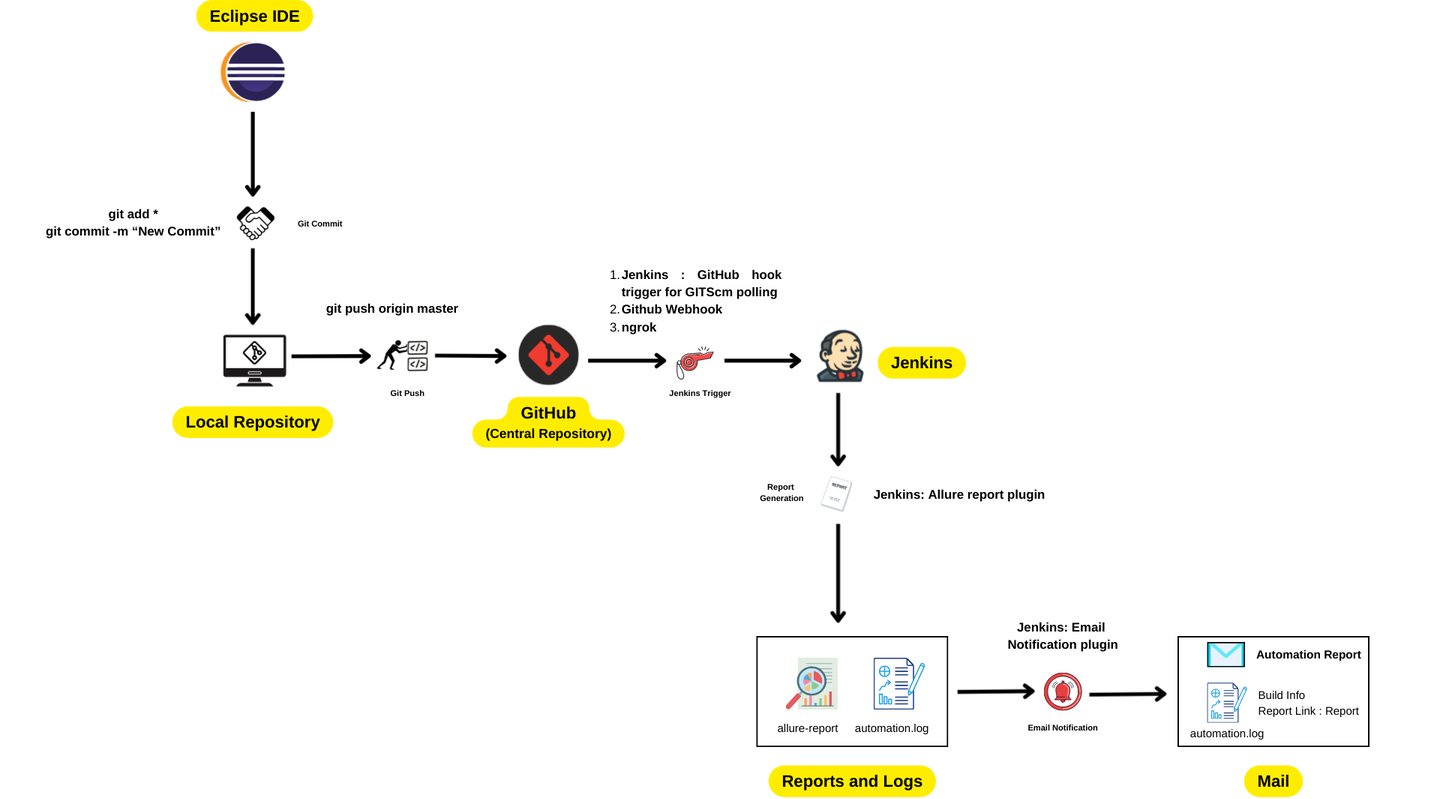
In this blog, I’ll walk you through how I implemented an end-to-end test automation pipeline using GitHub, Jenkins, and Allure, as illustrated in the architecture diagram above.
This setup ensures that every code change automatically triggers test execution, generates detailed reports, and notifies stakeholders—without manual intervention.
🧠 Project Overview
The goal of this project was to:
Automate test execution on every code push
Maintain a centralized code repository
Generate detailed execution reports
Notify the team with build status and report links
The entire pipeline starts from local development and ends with email notifications containing test reports.
🛠️ Tools & Technologies Used
Eclipse IDE – For writing and maintaining automation scripts
Git – Version control system
GitHub – Central repository
Jenkins – CI server for build and test execution
GitHub Webhook + Git Polling – Trigger Jenkins jobs
ngrok – Expose local Jenkins to GitHub
Allure Report Plugin – Test reporting
Jenkins Email Notification Plugin – Build notifications
🔁 End-to-End Pipeline Flow
Let’s break down the entire process step by step.
🧩 Step 1: Local Development Using Eclipse IDE
The pipeline begins at the developer/tester level.
Automation scripts are written and executed locally in Eclipse IDE
Once the code is stable, changes are staged and committed using Git:
git add . git commit -m "New Commit"
This ensures all updates are version-controlled before moving further.
🗂️ Step 2: Push Code to GitHub (Central Repository)
After committing locally, the code is pushed to GitHub:
git push origin master
GitHub acts as:
A single source of truth
A collaboration platform
A trigger point for CI execution
🔔 Step 3: Jenkins Trigger Using GitHub Webhook
To automate execution, Jenkins needs to be triggered whenever new code is pushed.
🔹 How this is achieved:
GitHub Webhook is configured to notify Jenkins
Git SCM Polling is enabled in Jenkins
ngrok is used to expose the local Jenkins server to GitHub
This ensures Jenkins receives real-time notifications even when running locally.
✅ Result: Any push to GitHub automatically triggers Jenkins
⚙️ Step 4: Jenkins Build & Test Execution
Once triggered, Jenkins performs the following actions:
Pulls the latest code from GitHub
Builds the project
Executes the automation test suite
Captures execution logs
This eliminates the need for manual test execution and ensures consistency across builds.
📊 Step 5: Allure Report Generation
After test execution:
Jenkins uses the Allure Report Plugin
Generates interactive test reports
Includes:
Passed/failed test cases
Execution trends
Detailed error logs
Artifacts generated:
allure-report
automation.log
These reports help quickly analyze failures and track test health.
📧 Step 6: Email Notification to Team
Finally, Jenkins sends automated email notifications using the Email Notification Plugin.
The email includes:
Build status (Success / Failure)
Direct link to Allure report
Execution logs for debugging
📬 This ensures stakeholders receive instant feedback after every build.
🎯 Benefits of This Pipeline
✔ Fully automated CI process
✔ Faster feedback on code changes
✔ Improved test reliability
✔ Reduced manual effort
✔ Clear visibility through reports
✔ Scalable for future enhancements
🧪 Real-World Use Case
This pipeline is ideal for:
Automation regression suites
API testing frameworks
Mobile or web automation projects
Agile and DevOps environments
It fits perfectly into daily CI execution, pre-release testing, and nightly builds.
🚀 Future Enhancements
Parallel execution for faster runs
Dockerized Jenkins setup
Cloud-based Jenkins (AWS/GCP)
Slack / Teams notifications
Scheduled nightly runs
📝 Conclusion
This project demonstrates how a well-designed CI pipeline can transform the way testing is performed.
By integrating GitHub, Jenkins, and Allure, I built a robust, scalable, and fully automated testing workflow that ensures quality at every stage of development.
If you’re looking to implement CI automation in your testing framework, this architecture is a solid and proven starting point.